The images show the German app. Captions in quotes remain as in the app.

Table of contentsOpen/close

ORGANIZE HOTEL OPERATIONS

Housekeeping & Maintenance.
Room ready, tasks in view

You coordinate cleaning and repairs, record room conditions and give the next shift a clear picture of the work completed and still to do.

To the overview

For employees, shift managers and area managers

Housekeeping & technology in the demo hotel.
Original product components with invented data · simplified demo framework
WHERE CAN I FIND THIS?

Hotelbetrieb → Housekeeping · Techniker

Go to setup

OVERVIEW

What can you do here?

You coordinate cleaning and repairs, record room conditions and give the next shift a clear picture of the work completed and still to do. The features you see depend on your hotel's activation and your role.

Prepare rooms in the demo hotel.

Which rooms need attention first?

Prepare the room

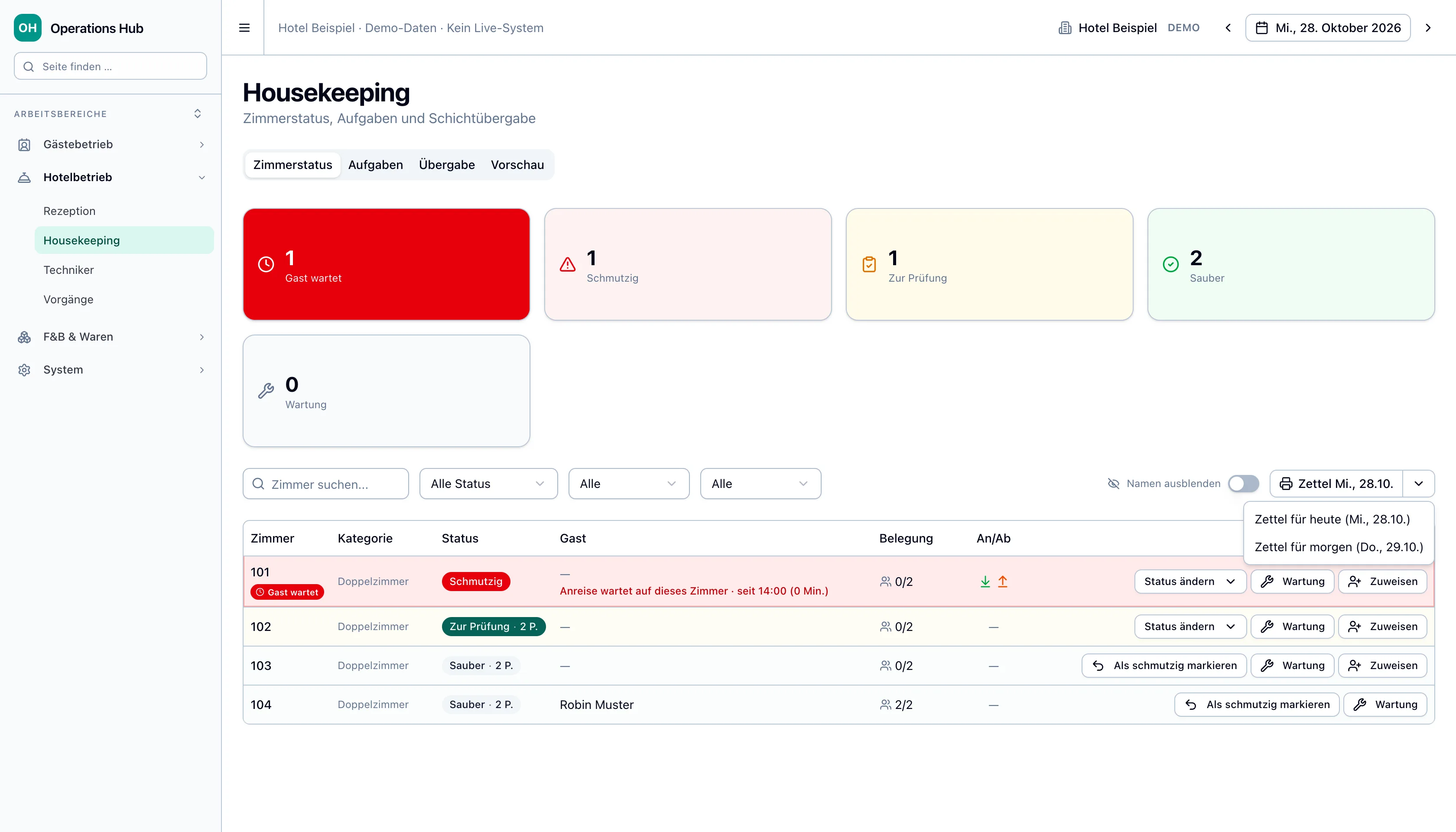
You see cleaning, arrivals and waiting guests together and document how many people a room is available for.

  • Recognize priorities
  • Document cleaning
  • Complete inspection

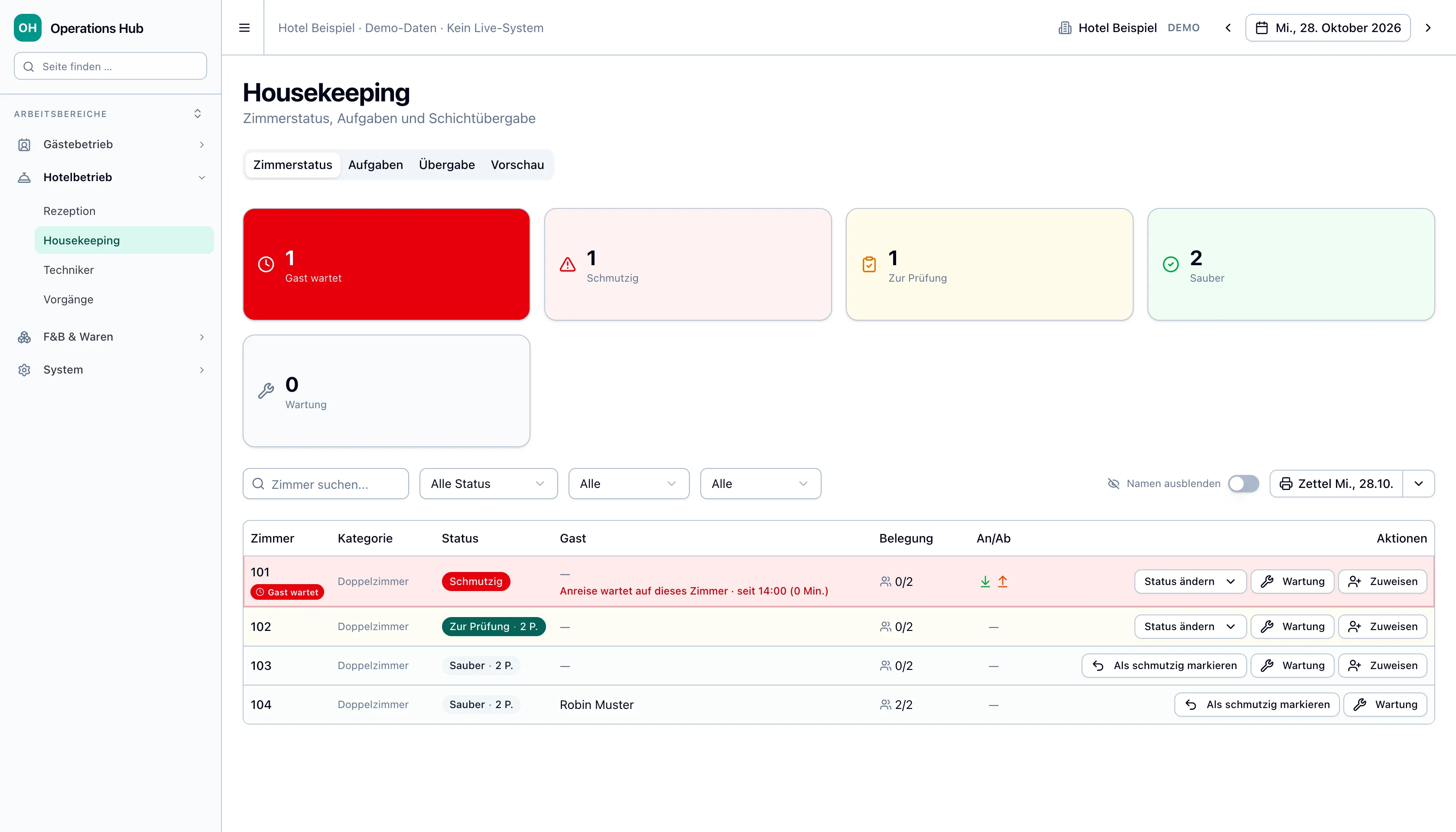
„Housekeeping“ → „Zimmerstatus“

Notes and work planning in the demo hotel.

What does the team take with them to the floor?

Room lists and work planning

You print the room list for the desired day and use the preview to plan the upcoming cleanings.

  • Appropriate day
  • Targeted selection
  • Preview

„Housekeeping“ → „Zimmerstatus“ · „Vorschau“

Check the technical condition in the demo hotel.

Which room needs repair?

Check technical condition

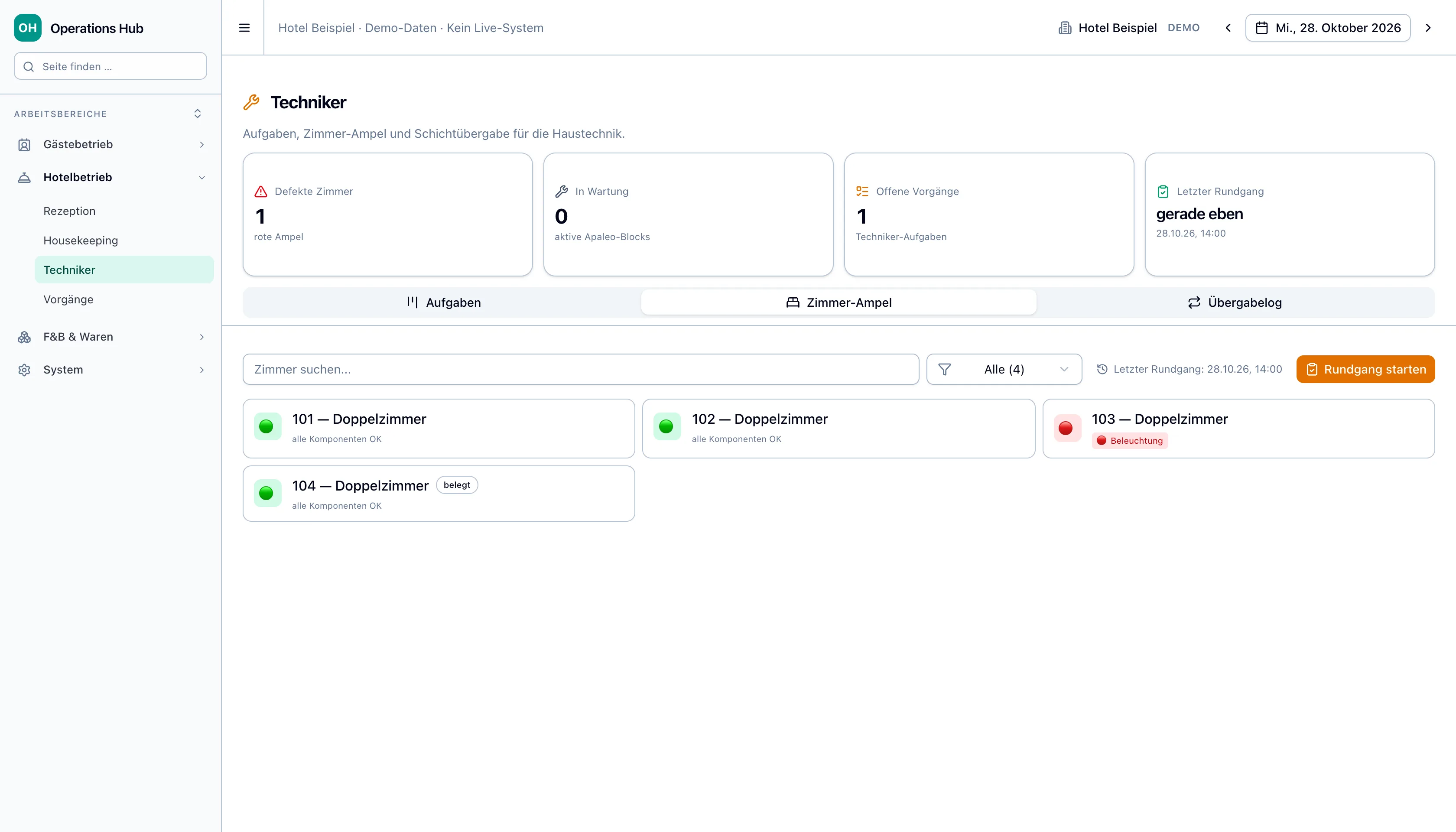
You can see the condition of individual components and record repairs in a comprehensible manner with notes and tasks.

  • Open room
  • Record the condition
  • Assign task
  • Tour

„Techniker“ → „Zimmer-Ampel“

Tasks and handover in the demo hotel.

How do housekeeping and maintenance work together?

Tasks and handover

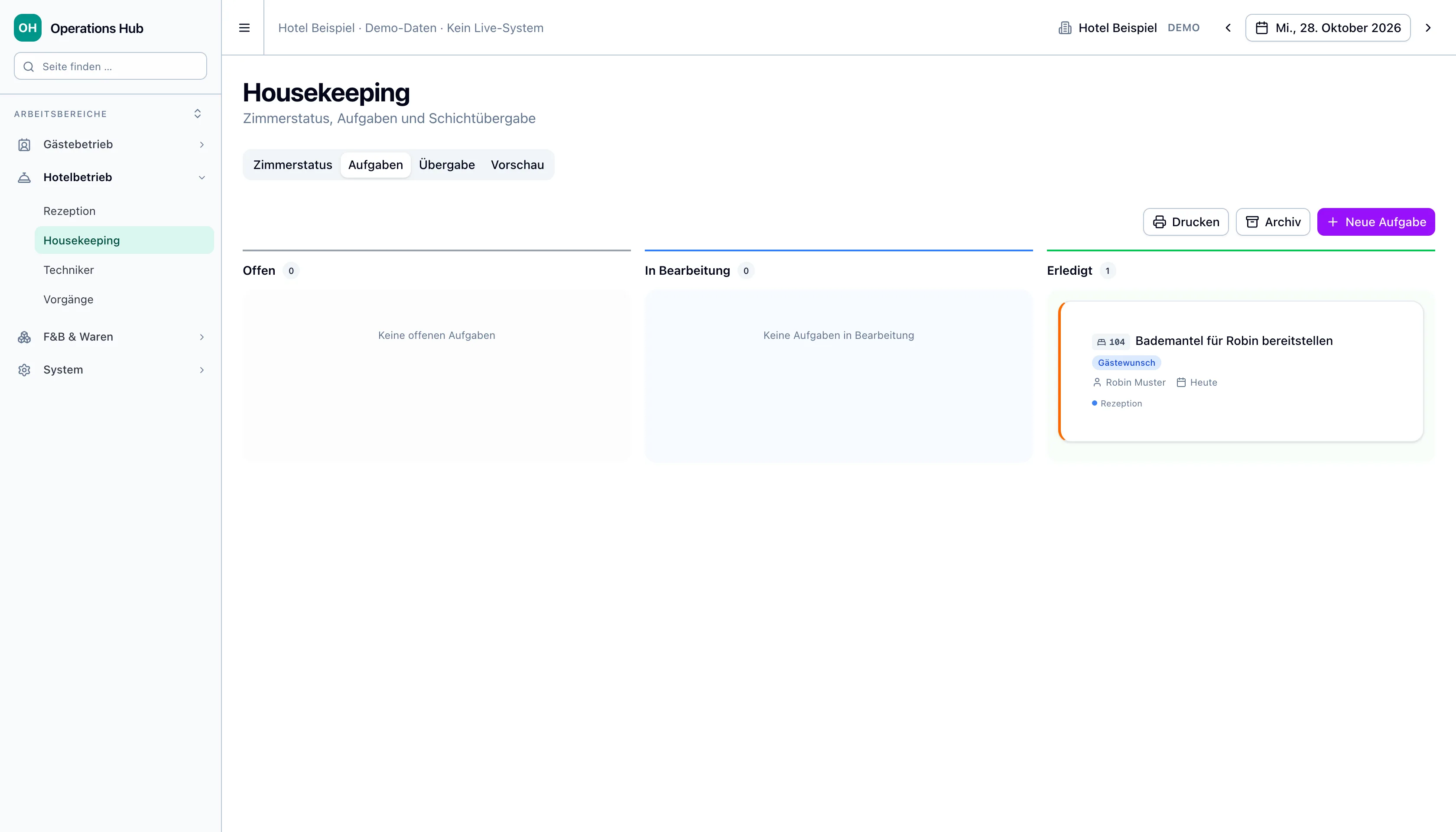
You distribute the work to the responsible departments and see the progress on their task boards.

  • Use Kanban
  • Work together
  • Hand over shift

„Housekeeping“ → „Aufgaben“ · „Übergabe“; „Techniker“ → „Aufgaben“ · „Übergabelog“

IN EVERYDAY LIFE

Step by step.

This is how you guide your team safely through their daily tasks.

Clean and release a room

Kim Beispiel prepares room 101 for two arriving guests.

STEP 1 OF 3

Select room

Open „Housekeeping“ → „Zimmerstatus“ and check room 101 and the upcoming arrival.

The result
You have the right room and the preparation you need in front of you.
1 / 3
Select rooms with fictitious example data.
Original product component · Demo dataEnlarge image

COMMON ERRORS

Common mistakes

These differences help you get reliable results.

  1. Accept the number of people without checking

    What happens
    The room can be prepared for fewer people than actually arrive.
    This is the right way
    When recording the cleaning, confirm how many guests the room has actually been prepared for. Instructions "Clean and release a room“ →
  2. Print the wrong day or only a partial list

    What happens
    The housekeeping trolley may carry a list that misses rooms or arrivals for the next shift.
    This is the right way
    Check date and filter before printing; For tomorrow, use the entry expressly provided for this purpose. Instructions "Prepare the room list for the next shift“ →
  3. Understand „Namen ausblenden“ as complete anonymization

    What happens
    Information about children or names in task titles can still identify people on the printout.
    This is the right way
    Also check the other information and treat the piece of paper as an internal working document. Instructions "Prepare the room list for the next shift“ →
  4. Equate a defect with a sales ban

    What happens
    A technically defective room can still be booked.
    This is the right way
    Record any required room block as maintenance and check the maintenance type; „Wartung · weiterhin buchbar“ leaves the room available to book. Instructions "Understand a defect in the room“ →
  5. Complete a task without checking the component condition

    What happens
    The room traffic light may show a different condition than the completed repair.
    This is the right way
    After work, check the condition of the component and any maintenance that may still be required. Instructions "Understand a defect in the room“ →

QUESTIONS & ANSWERS

Answered briefly.

What do the colors in the room traffic light stand for?

Green means „OK“, yellow means „Achtung“ and red means „Defekt“. Ongoing maintenance is displayed separately. Open the room to see the affected component.

What does „Alles OK“ do in the tour?

You confirm that components already marked green have been checked. For other conditions, open the detailed inspection and record their actual condition.

Is a clean room automatically free?

Cleaning status, occupancy and maintenance are separate details. A room can be clean and still be occupied or locked.

Where do full cleaning and linen changes come from?

The preview follows the stored house rules and the stays. Coordinate the cleaning schedule with your hotel management; a missing rule is not an automatically established standard.

Where can I find the detailed explanation of tasks?

The „Vorgänge“ page explains guest and reservation reference, „Aktiv ab“, „Fällig am“ and processing by multiple departments.

SETUP

Set up the area

Prepare the basics so the team can get started right away.

„Housekeeping“ → „Zimmerstatus“

Coordinate cleaning and inspection

A clear process determines who cleans and who checks the rooms.

Here's how to set it up

  1. Decide as a team when a room „Zur Prüfung“ will arrive and who will release it.
  2. Compare the preview and notes with the cleaning cycles of your house.

Done when...

… Done when cleaning, number of people and approval can be clearly traced in a sample room.

1 / 2
Checklist before release
  • The team can distinguish between cleaning and room clearance.
  • Notes for today and tomorrow were checked against the house rules.
  • Components, tasks and maintenance have clear responsibilities.