The images show the German app. Captions in quotes remain as in the app.

Table of contentsOpen/close

TEAM & STAFF

Duty scheduling.
A coordinated plan for each week.

Assign shifts by hotel and department and publish the agreed weekly roster. Mara schedules an early shift for Robin, checks the rest of the team and publishes the correct week.

To the overview

For department management, hotel management and human resources departments

Duty planning with fictitious data.
Original product components with invented data · simplified demo framework
WHERE CAN I FIND THIS?

Personal → „Dienstplan“

Go to setup

OVERVIEW

Accompany the team well.

Select the task you currently want to complete. The features you see depend on your hotel's activation and your role.

Week & departments in the demo hotel.

Who works when and where?

Week & Departments

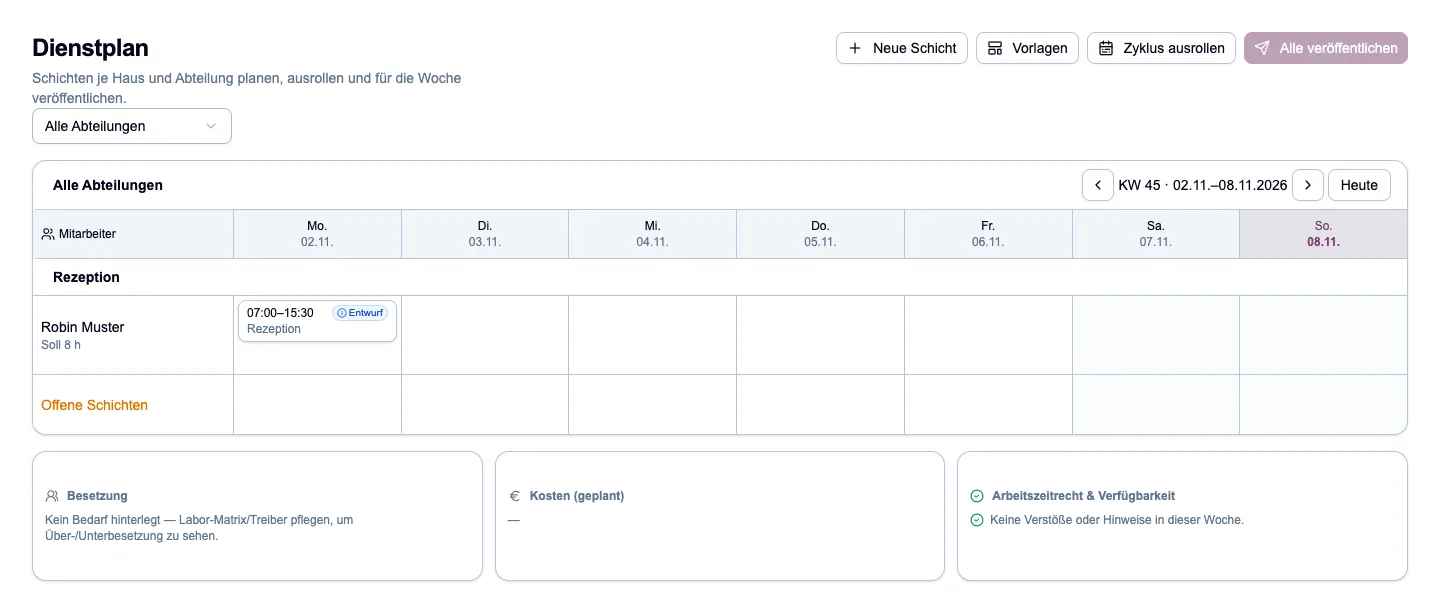
You see the staffing in connection with the hotel, department and calendar week.

  • Weekly grid
  • All departments
  • Notes

„Dienstplan“

Edit shifts in the demo hotel.

How do I staff the shift?

Edit shifts

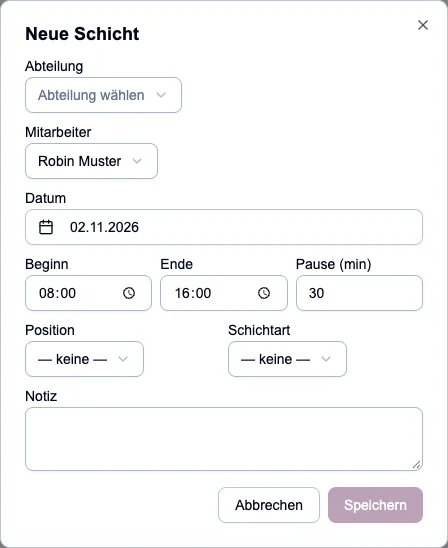
You create shifts, change times and assign a suitable person.

  • Open shift
  • Start, end & pause
  • Position & shift type

„Dienstplan“ → „Neue Schicht“

Templates & Cycle in Demo Hotel.

What can I reuse?

Templates & Cycle

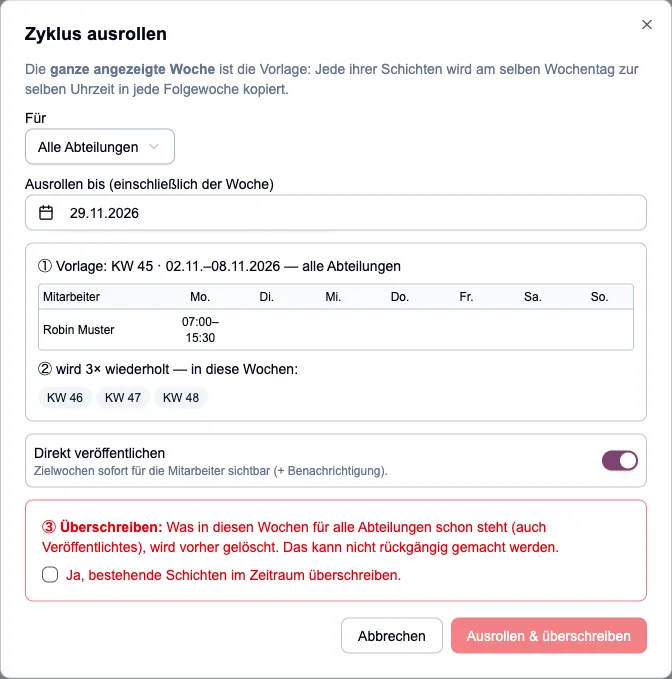
You incorporate recurring shifts into the next planning in a controlled manner.

  • Templates
  • Source week
  • Target selection

„Dienstplan“ → „Vorlagen“ · „Zyklus ausrollen“

Released in the demo hotel.

What is the plan for the team?

Publication

You publish the audited week and check the result for each department.

  • Draft
  • Publish week
  • Publish all

„Dienstplan“ → „Woche veröffentlichen“

IN EVERYDAY LIFE

Step by step.

The examples accompany Mara Example and Robin Muster through their everyday work in the demo hotel.

Prepare the right week

Mara is planning the next morning shift at the demo hotel.

STEP 1 OF 2

Select hotel and week

Select exactly one hotel in the header and open „Dienstplan“. Set the desired calendar week.

The result
The plan shows the intended hotel and the correct week.
1 / 2
Select hotel and week with fictitious personal data.
Original product component · Demo dataEnlarge image

COMMON ERRORS

That's what matters.

These distinctions help ensure that personal information and decisions are handled correctly.

  1. Scheduled shifts treated as work performed

    What happens
    The duty roster describes the intended deployment and does not show actual working hours.
    This is the right way
    Review and correct work done under „Arbeitszeiten“. Instructions "Create or change a shift“ →
  2. Cycle rolled out over target weeks that have already been agreed upon

    What happens
    This action replaces existing shifts in the selected scope, including published shifts.
    This is the right way
    Check target weeks and person selection and make a conscious decision about „Direkt veröffentlichen“. Instructions "Roll out a weekly cycle in a targeted manner“ →
  3. End time of a night shift misunderstood

    What happens
    An end time before or equal to the start time is treated as an end on the following day.
    This is the right way
    Check the date and duration of a shift over midnight before saving. Instructions "Create or change a shift“ →
  4. Joint publication considered complete

    What happens
    Individual departments may publish successfully while others fail.
    This is the right way
    Read the feedback for each department and specifically work on the remaining open parts. Instructions "Publish the week“ →

QUESTIONS & ANSWERS

Answered briefly.

Why do I have to choose exactly one hotel?

The weekly plan is maintained for a single hotel. Select the hotel in the header bar; Within the hotel you can switch between a department and the shared view.

Is an open shift already filled?

An open shift describes a shift that is not yet occupied. Check the actual assignment of people before considering the team complete.

Is the source week also overwritten when rolling out?

The target area begins the following week. Nevertheless, check the source week completely, because its shifts form the pattern for the adoption.

What does person selection mean when rolling out?

For specifically selected people, their shifts will be replaced to the extent targeted. Other employees and open shifts remain outside this selection of people.

How do I use shift templates?

Open „Vorlagen“ and maintain the aligned recurring shifts. After each takeover, check the person, date and department; a template does not replace the examination of the specific week.

Is a notification a read receipt?

Publishing triggers notifications. This does not mean that every person affected has read the plan; Clarify short-term changes within the team.

SETUP

Prepare for collaboration.

Clarify the basics before the team works with the area.

„Mitarbeiter“ · „Abteilungen“ · „Dienstplan“

Prepare personnel and planning bases

Check the active employees and their department assignment.

Here's how to set it up

  1. Check the active employees and their department assignment.
  2. Agree on positions, shift types and templates.
  3. Determine who plans and who publishes for the week.
Prepare personnel and planning bases in the demo hotel.
Original interface with demo data · Enlarge image

Done when...

… The team can plan the right department and release the plan specifically.

1 / 1
Checklist before release
  • Hotel, period and responsibility have been checked.
  • The required data is complete and current.
  • Releases and follow-up tasks are coordinated with those responsible.